Case study - adding features to an AI generated codebase
You must have the expertise to verify AI-generated output, as technically correct syntax does not guarantee factual accuracy. Failing to review the details means your final work will be incorrect.
In my previous article I showed how I used a local LLM running on my Intel B50 to convert a Python utility to Go. While the functional equivalent is certainly useful, adding new features and improving the utility is really what I was after. To show how I went about and added features, I want to first explain how I thought about the process of adding new features.
Software factories
Last week I participated in a webinar where the topic of software factories was discussed. Software factories are the current rage, or at least have been until very recently and depending on how well this article ages, the hype might still run for a little while. The host of this webinar was Kelsey Hightower, a ex-Google distinguished engineer.

Kelsey and I see eye to eye on many things and the one thing that we both agree on is that the software development process hasn't fundamentally changed, some tools have been added, but in reality it's still the same. Requirements lead to the definition of features and features are implemented by developers. I'd encourage you to watch this exchange to get a bit grounded, which is important in this period of hyped-up expectations.
Feature definition
In order to develop a feature, the person defining the requirements needs to be able to verbally express how the outcome of that feature will be presenting itself. In other words, we need to imagine and be able to describe what we want to implement and how it should look like.
Exactly this is the single largest inhibitor to successful AI adoption. While anyone can now "code", not everyone's expression is clear, concise or even close to what they want to build. People that can build things in 2026 are people that can express their thoughts. You are now looking for thinkers, writers and editors, essentially liberal arts professionals. Shocking, I know!
I'm not the only one making this observation: "I think the most important thing in any project you’re building with AI (and even without it), from building a web app, to starting a business, to managing a federation of planets, is how completely and accurately you articulate exactly what you want."
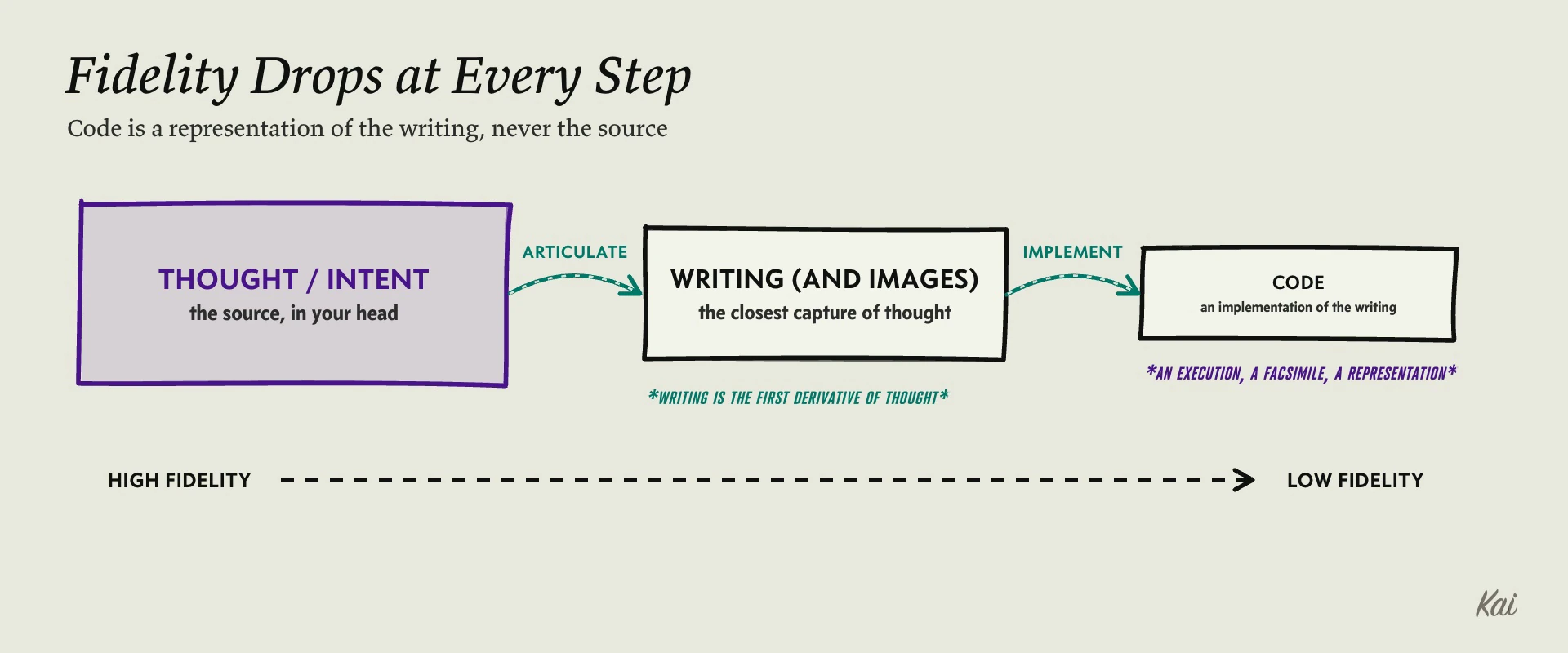
Traditionally this was done using PRD's, used as input to design documents and refined using an iterative process between developers and their peers in Product Management (hopefully, that's how it worked in your organization). These requirements were analyzed, estimated and implemented based on importance, prioritized and put on roadmaps - the classic software production cycle. If we use the same approach with a software factory we describe the feature in terms that the LLM understands and produces the output that we want.
Mermaid as a new feature
For this article, I chose to add a feature to generate a Mermaid diagram each time a WireGuard config is generated. A textual representation of it look like this:
graph TD
subgraph sdehefsn1dc120001
Hub_sdehefsn1dc120001["sdehefsn1dc120001 (IP: sdehefsn1dc120001.de.siekmann.net, Allowed: 192.168.122.0/24)"]
end
subgraph susscpdx1dc10004
Hub_susscpdx1dc10004["susscpdx1dc10004 (IP: vpn.us.siekmann.net, Allowed: 10.0.103.0/24)"]
end
They display like this:
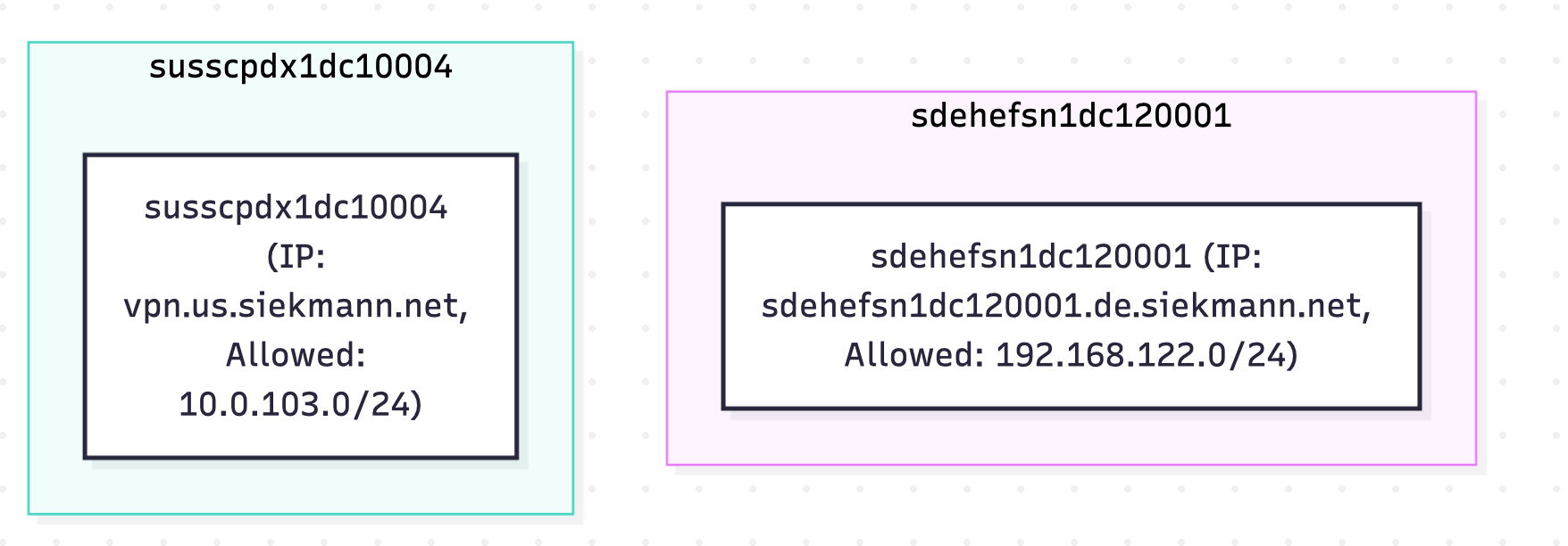
I created a markdown file with the requirements and I loaded up the previous pi.dev session and prompted my harness to read the markdown file and discuss it with me, similar to the "claude/grill me" functionality.
The LLM correctly understood the requirement for the most part and had a few questions for clarification. I went through a quick edit cycle, defined my response and updated the requirements document and told my harness to re-read the markdown file.
I think it's important to mention and clarify that using an LLM is not magically going to produce error-free code or that the process to get error-free code is completely obvious or assured.
QA round 1, KO'ed immediately
This became obvious when I ran the utility with an existing overlay network. Only the hubs were visible, spokes were not connected. This was a logical oversight on my end in the requirements, since I stated I wanted only the closest neighbor, and not the complete path. I clarified this in my prompt and re-ran the code generation, based on this new version, which unfortunately, delivered the same exact result. After a bit of reflection, I realized that my requirements were wrong. A n algorithm that checks path reachability (the LLM suggested BFS) will make the diagram look 'weird'. Paths are different from logical structure.
Iterating on the right requirements burns tokens
Since my requirements described a desired state based on my wrong feature definition, I had to rethink and rewrite my markdown file. I specified to use the Wireguard address CIDR and not the AllowedIPs and restarted the code generation. Hopefully one last time!
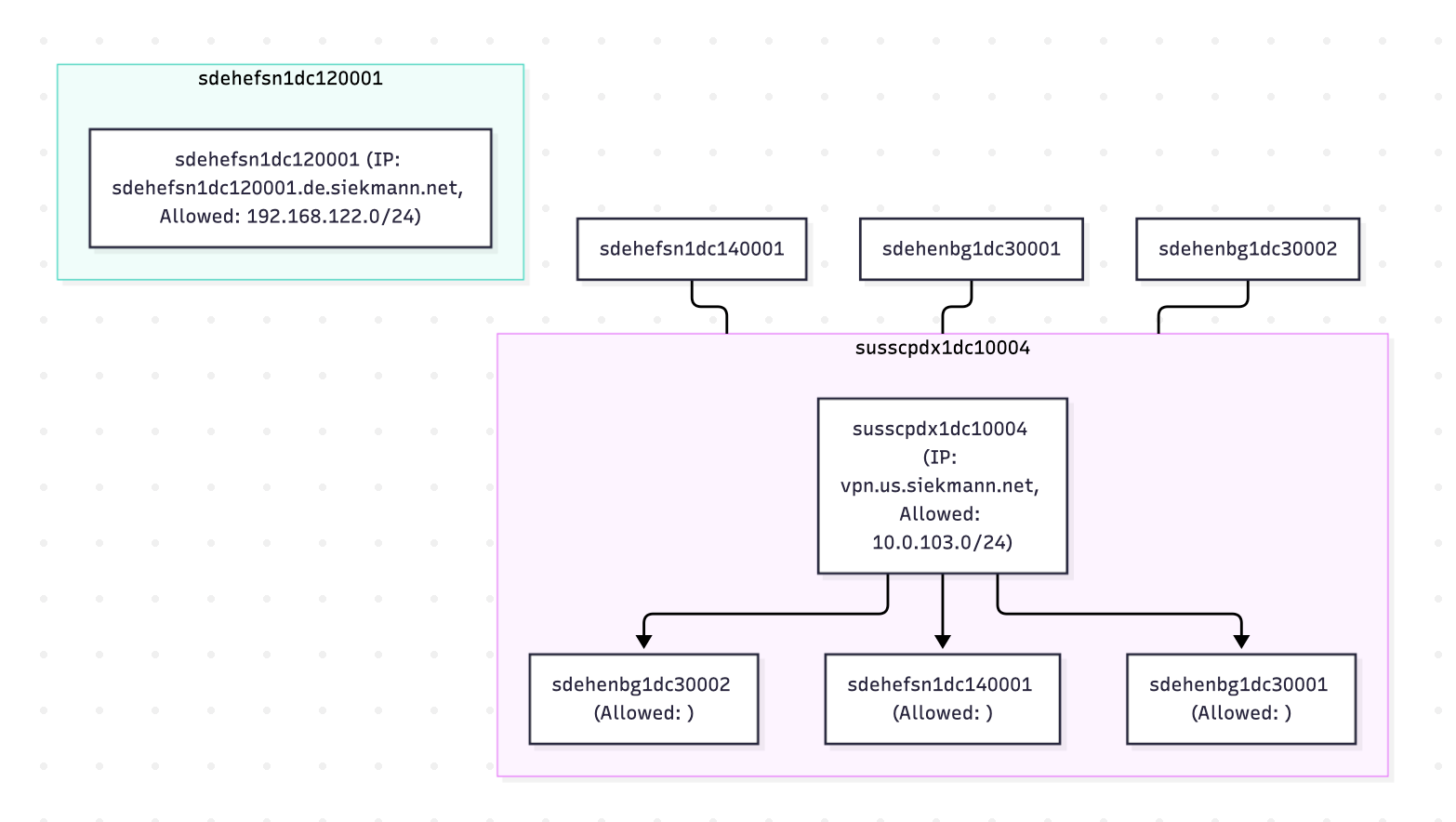
Here's what it came up with after the refined requirements. Better, still - not quite right!
Going back and forth with a model quickly burns through tokens, which isn't financially relevant with local LLMs, but if you are using a top-tier hosted LLM, these kind of ambiguities and logical errors quickly add up. So far, this project has gone through 500K tokens up and while that's only a few Dollars using Claude Fable ($10/1M input tokens), I'm not done here. So far, my bill is next to zero due to local infrastructure.
Local models can loop when they run out of "ideas". This happened multiple times after context window compaction. Things that get dropped can be valid path names, or even the current working directory. For some reason, at some point the LLM decided to misspell "os.MkDirAll" (correct is os.MkdirAll). I had to work through a number of failing "go build" attempts with pi.dev and steer it in the right direction until we came to an agreement:

To help the model out, I loaded the database.csv into the context, which turned out to be both helpful and a problem. Because files loaded into context are cached, information can be lost when compaction occurs. It's better to specify reading files instead of trusting the cache.
Confidently (still) wrong and ugly
While it was fun to see the model argue with me and reason with itself, it's a bit like managing a 5 year old with excellent syntax skills building nonsense. Maybe a slight exaggeration, but you get the gist. What I had in mind was a classic hub and spoke architecture diagram, not a number of duplicate boxes randomly placed:
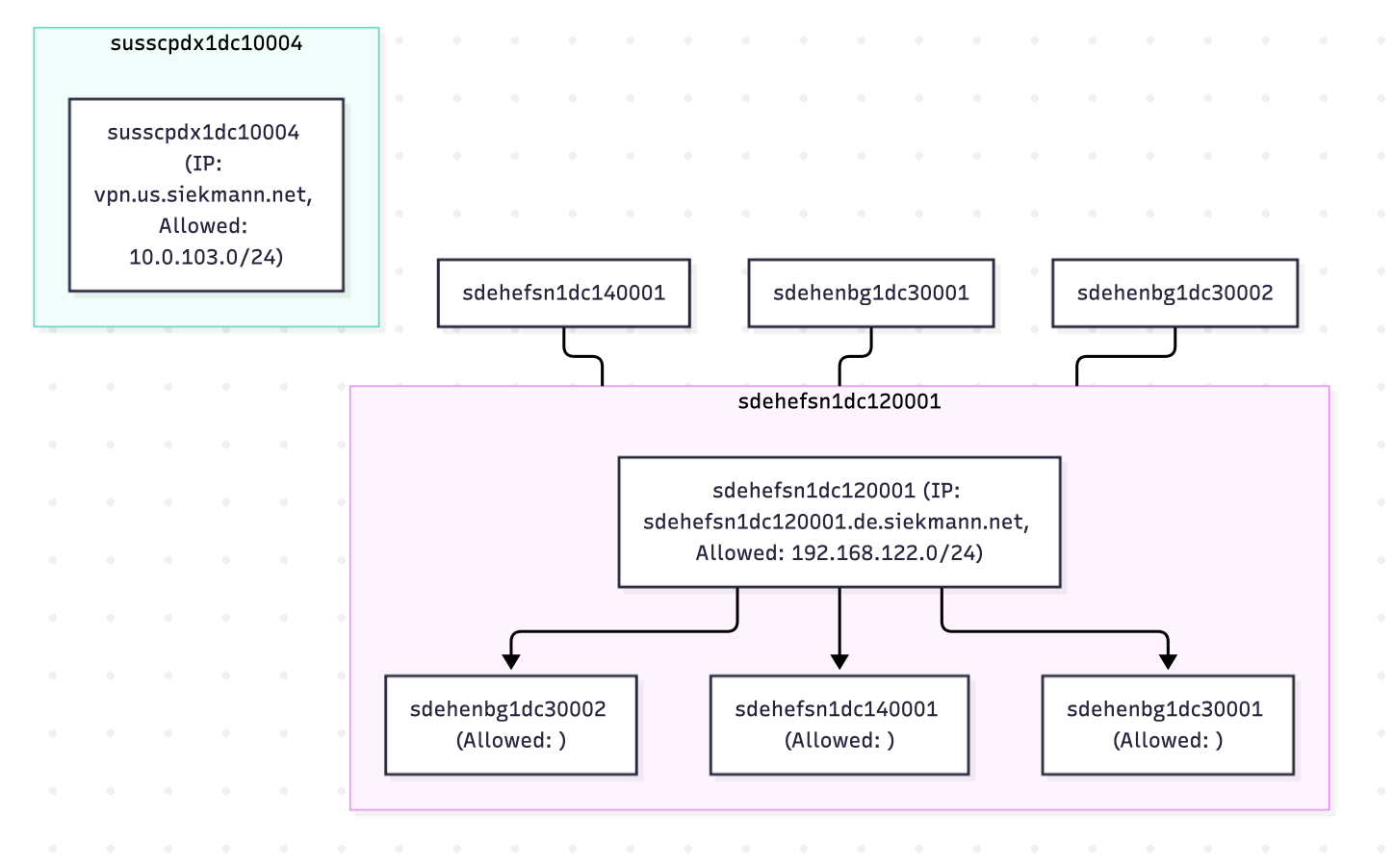
The net-net of this is simply this: Whatever your coding assistant is building, at some point you need to have the expertise to make a judgement call on if what was built is correct. Building diagrams of network architecture that are syntactically "correct" but don't describe the actual architecture is not just "not helpful", it's wrong. And if you don't look at the details, your work is, too.
I'd love to hear about your experience and questions and are here to assist in your local projects as business-level advisor as well as tech resource. These are fun projects and I'd like to help you. Check out my website at https://thegoodguyai.com for more information and contact. Feel free to book some time with me using my Calendly link at https://calendly.com/tggai.
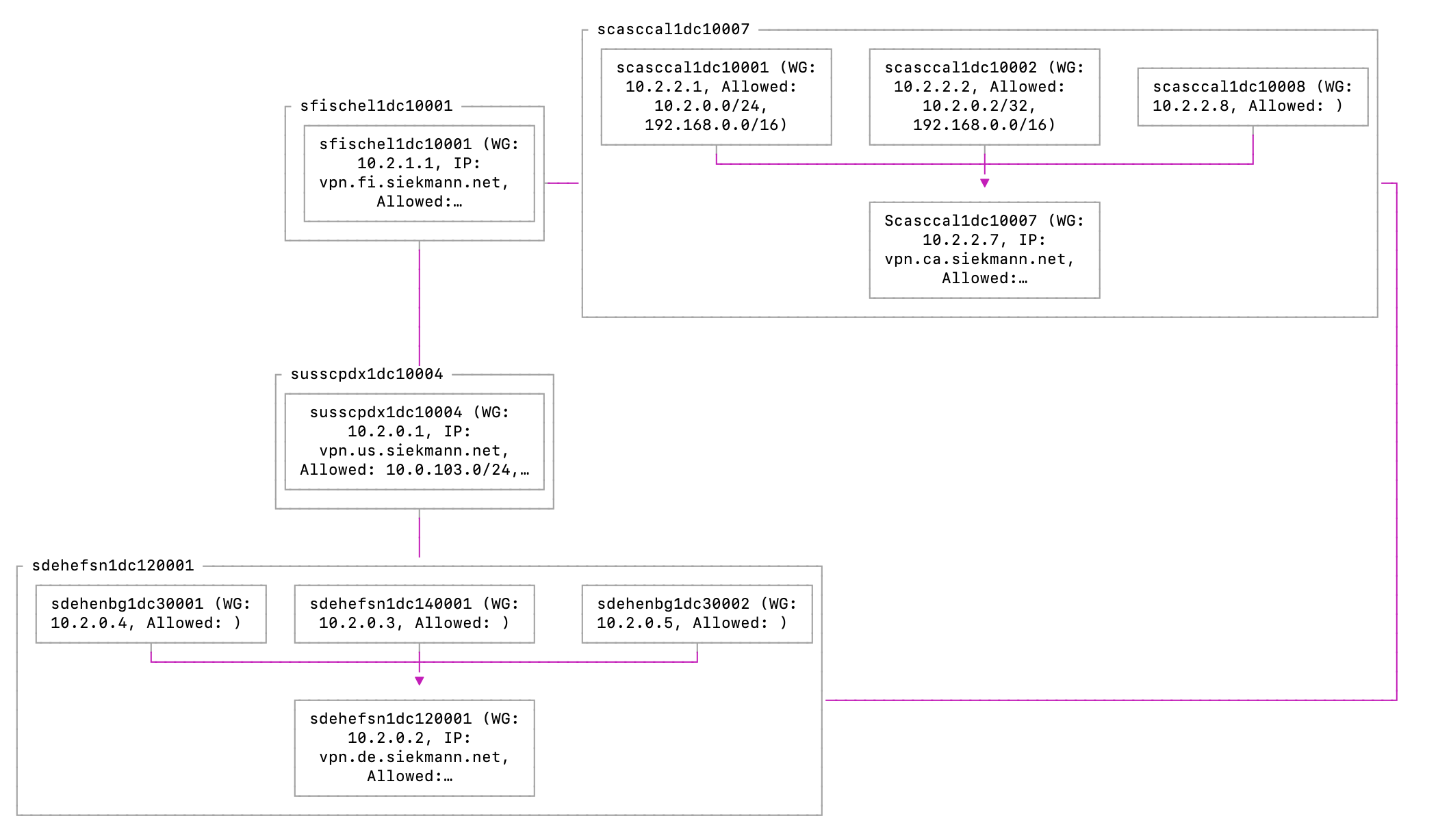
And finally, the correct diagram (it's not a real production environment, by the way): 😄
In VS Code - that's more like a real diagram, would you agree?